Chat on Askability

Materials in this section:
 Password-Reminder.pdf
Sheets for filling in as a reminder for log-in details
Password-Choices.pdf
Set of password choices for use with the reminder sheet
Avatar-Choices.pdf
Set of avatar images for use with the reminder sheet and for students
Chat-Vocabulary-Cards.pdf
Vocabulary cards to cover the main options in the guided chat
The Chat Zone
This is an area where students can ‘chat’ in a safe environment.
Social networking is becoming increasingly popular. The level of involvement and participation offered by the Chat Zone on Askability is the closest that many children and young people with language and communication difficulties will get to being involved in an online environment or community.
Registering
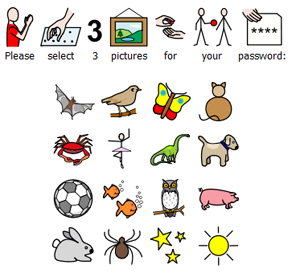 Any web user can access this section to view messages being posted. However, in order to ‘chat’, the user will need to register first, with which the young person may require some assistance.
In order to register to use the Chat Zone, the child or young person will need to enter their name, their date of birth and their email address. Their email address and date of birth will be kept private.
They then select an avatar from a selection of 50 images and create a ‘password’ from a range of pictures. This password needs to be any three of these images, in any order. The student could choose the same image three times – it just needs to be a sequence that they will remember.
A sheet of the 'Password Choices' is available to download (above). These can be cut up and kept as a reminder to a child’s password combination. A sheet of 'Avatar Choices' is also available. These can be used as a reminder. Students may like to use their avatar in other activities.
The 'Password Reminder' card is an easy to use template, to stick a child's password and avatar to. These can be kept given to the child to take away so that they can remember their log-ins for use at other computers and at home.
Chatting
Once the user has registered, they will be able to login and ‘chat’ with friends using their username (this will be automatically generated and will consist of their first name and number – dependent on amount of same names registered) and their chosen avatar.
Students will see symbol options which they can select to communicate with other Askability Chat Zone users.
They begin by selecting either I am… or We are….
The next step to choose from different subjects e.g. playing, feeling, hobbies.
Selecting a subject takes them to specific activities. e.g. reading a book, making cards, making cakes.
After this you can choose to also add where you were or who you were with.
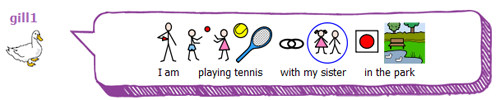
The user will be able to see their sentence developing in a box beneath the symbol options. When they have finished their sentence, they just need to click on ‘Finish’ and then ‘send’ their sentence to the Askability site.
As the symbols are all pre-loaded, there will be no need for moderation in this section. However, we will still monitor all posts submitted, and will contact users using their email address if we feel concerned about any of their posts.
There is a set of 'Chat Vocabulary Cards' that can be cut up and used to support chatting. The cards cover most of the main vocabulary available in the Chat Zone. The cards can be using in general discussion. Or a student can select and sequence the cards to help them prepare what they want to chat about.
Commenting on other posts
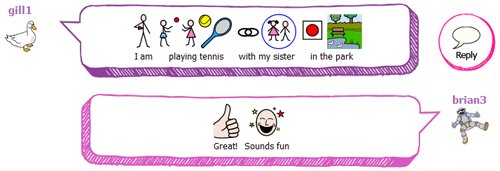
Users can also comment on posts made by others by clicking ‘Reply’ next to the comment, and choosing from the symbol options to construct a sentence.
Each user’s most recent post will be displayed as part of a list on the ‘Chat with friends’ page.
My Page
Users can see their own posts, and any comments others have made on their posts, on ‘My Page’.
The Askability Chat Zone is a safe way to introduce children and young people to chat sites. It provides an area where they can learn and develop this social skill, within a secure site.
The Chat Zone can be hugely beneficial to children and young people who may feel isolated at home, by giving them access to an area where they can make friends. For those who go away to residential schools, it will give them an opportunity to stay in touch with friends during the holidays.
The next section gives information about the Widgit Symbols used on the site: Next
- Home
- What is Askability?
- What’s on the Askability website?
- Reading Askability online
- Offline Activities
- Participating in the website
- Chat on Askability
- Widgit Symbols
Go to Askability.org.uk